
 Русский
Stepper Motor Driver Communication Error Troubleshooting Guide
A stepper motor driver communication error is one of the most frustrating issues in industrial automation. From CNC machines and packaging equipment to robotics and inspection systems, unreliable driver communication can bring an otherwise stable motion system to a halt.
Based on real-world commissioning and field troubleshooting experience, this guide breaks down the most common causes of communication failures and explains how engineers actually diagnose and fix them on-site.
1. Hardware Connection Issues
Loose or Damaged Signal Cables
In practice, more than half of communication faults start with something simple: connectors. RS-485, CAN, or EtherCAT cables that look fine externally may suffer from oxidized terminals, loose crimps, or internal conductor fatigue—especially in moving cable chains.
Reseat all connectors and inspect pins for oxidation
Check continuity with a multimeter during motion
Replace suspect cables rather than reusing them
Incorrect Cable Type or Excessive Length
Using unshielded cable or exceeding protocol limits leads to signal distortion. For example, RS-485 networks longer than ~1200 meters without repeaters often show intermittent dropouts.
Use shielded twisted-pair cables and keep communication wiring physically separated from motor power lines.
2. Electromagnetic Interference (EMI)
High-power motors, VFDs, and switching power supplies can inject noise directly into communication lines. EMI-related stepper motor driver communication error issues often appear random and temperature-dependent.
Avoid parallel routing of signal and power cables
Add ferrite cores at both ends of communication cables
Use single-point grounding to reduce ground loops
3. Communication Parameter Mismatch
Baud Rate and Frame Format
Even one mismatched parameter—baud rate, parity, stop bit—can completely block communication. This is especially common in Modbus RTU networks with multiple devices.
Verify 8-N-1 or required format on both controller and driver
Confirm slave address uniqueness
Check CRC errors using protocol diagnostic tools
Wrong Protocol Selection
Confirm both devices are configured for the same protocol (Modbus RTU, CANopen, EtherCAT). A correct cable with the wrong protocol will still fail silently.
4. Power Supply and Grounding Problems
Unstable or undersized power supplies can cause communication ICs to reset or malfunction. In 24V systems, voltage sag below ~20V during load changes is a common root cause.
Measure supply voltage under dynamic load
Ensure adequate power margin
Verify proper earth grounding (<4Ω)
5. Firmware and Software Factors
Outdated driver firmware or poorly structured controller code can trigger repeated timeouts and retries.
Update driver firmware when available
Validate command timing and response handling
Use tools like Modbus Poll or CAN analyzer to inspect frames
6. Actual Hardware Failure
When all else checks out, physical damage becomes the likely cause. ESD, wiring mistakes, or overvoltage can permanently damage communication ports.
Inspect for visible port damage
Measure signal impedance to ground
Cross-test with a known-good driver
7. Step-by-Step Diagnostic Workflow
Restart system and observe repeatability
Simplify to minimum network configuration
Swap cables, then driver, then controller
Verify signal quality with oscilloscope if needed
Driver Selection Matters More Than You Think
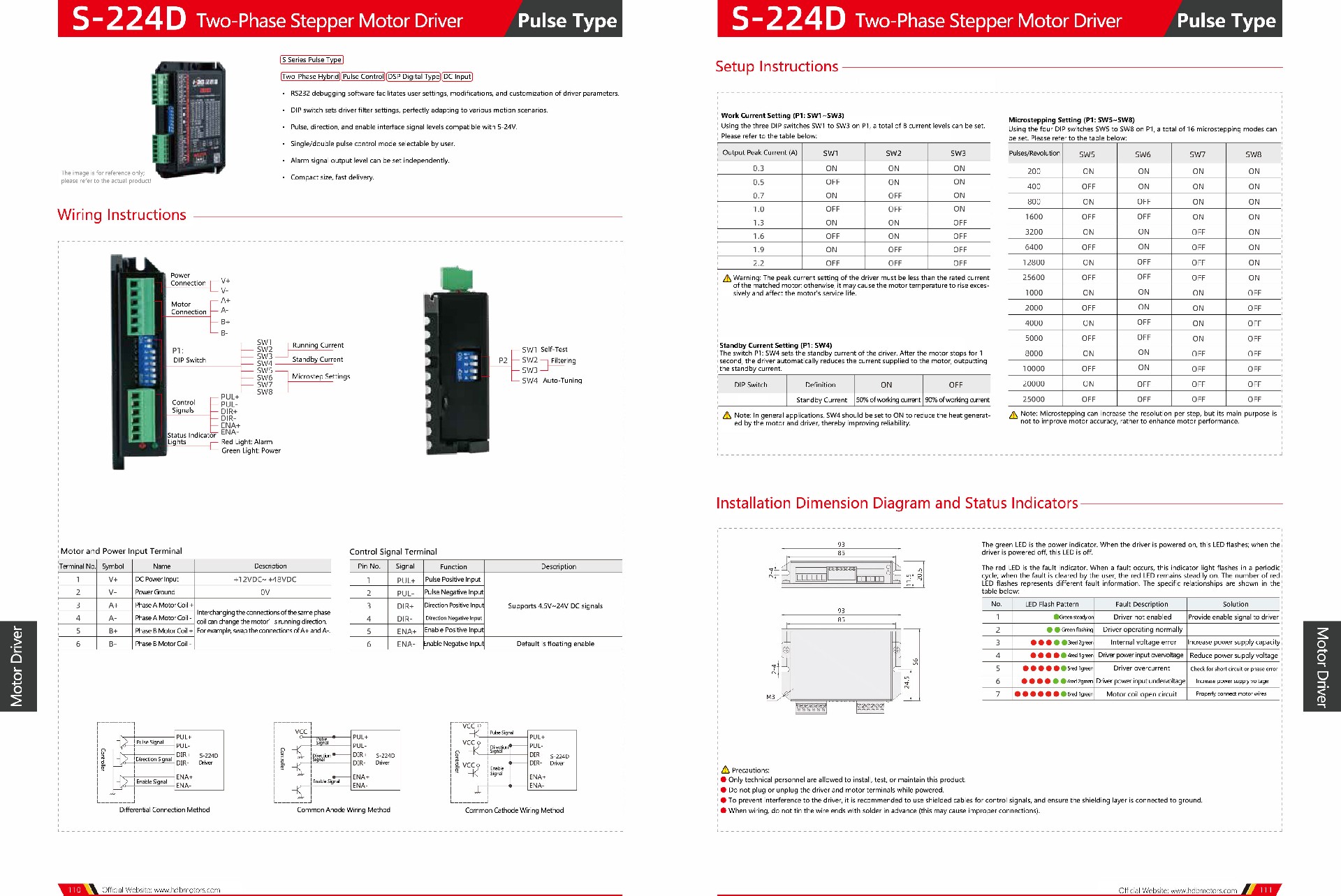
In many projects, persistent stepper motor driver communication error problems disappear after switching to a driver designed with robust filtering and flexible configuration.
In real automation systems, engineers often prefer bus-type and intelligent stepper drivers that allow:
DIP-switch configurable filtering for different motion profiles
5–24V compatible pulse / direction / enable signals
Selectable single or dual-pulse control modes
User-defined alarm output levels
Compact size and fast delivery also reduce system redesign time when schedules are tight.
Available Driver Series for Different Applications
For reference, commonly deployed industrial driver models include:
Bus Type / S-245D / Intelligent Type / S-224D / CSH-2285R / SSA Series / S-2822H / SSD Series / S-266D / DBL-4850H
These platforms are designed to adapt to diverse motion scenarios through hardware-level configuration rather than fragile software workarounds.
Need Help Choosing or Troubleshooting?
If your system still reports communication errors after following the above steps, it may require a driver matched more precisely to your control architecture.
HDBMOTOR engineers regularly assist customers in diagnosing communication faults and selecting suitable stepper drivers for their machines.
Note: the website product listing may not include all available configurations. You are welcome to leave a message describing your application to request full specifications, wiring recommendations, or sample support.
For related motion control topics, you may also find these helpful: